Few things are as frustrating in a bustling kitchen as a locked oven door, especially right after you’ve diligently run a self-cleaning cycle. You expect a gleaming interior, ready for your next culinary adventure, but instead, you’re greeted by an unyielding barrier. This common household dilemma can bring your cooking plans to a screeching halt, leaving you wondering why your oven decided to stage a lockout. Fortunately, in many cases, this isn’t a sign of a major breakdown but rather a safety feature or a minor electronic glitch that can be resolved with a few simple steps. This guide will walk you through understanding why your oven door locks, effective troubleshooting methods you can try at home, and when it’s time to call in a professional.
Understanding Why Your Oven Door Locks After Cleaning
Oven doors primarily lock after cleaning cycles for crucial safety reasons. The self-cleaning function is designed to tackle baked-on grease and food spills by incinerating them at extremely high temperatures, transforming stubborn residue into easily wipeable ash.
The Self-Cleaning Cycle Explained
Table is empty.During a self-cleaning cycle, your oven reaches temperatures far beyond normal cooking ranges, often soaring to around 900°F (480°C). This intense heat effectively carbonizes food debris. While incredibly efficient, these temperatures are also extremely dangerous. Internal components expand, and the oven becomes unsafe to open, making a locking mechanism absolutely essential.
The Essential Safety Mechanism
The automatic door lock is a non-negotiable safety feature, designed by manufacturers to protect you from severe burns, prevent fire risks, and avoid damage to the oven’s internal components. This lock engages automatically once the self-clean cycle begins and remains activated until the oven’s internal temperature drops to a safe level, typically around 200°F (93°C) or lower. This cooling process can take anywhere from 30 to 90 minutes, and sometimes even up to two hours, after the cleaning cycle has officially ended. If the oven detects that it’s still too hot, the door will simply not unlock, even if the display indicates the cycle is complete.
First Aid for a Stuck Oven Door: Patience and Power
When your oven door remains stubbornly locked, your first instinct might be to panic or even try to force it open. However, resisting this urge is critical. Starting with patience and a few basic power-related checks can often resolve the issue without further complications.
The Golden Rule: Allow for Complete Cooling
The most common reason an oven door stays locked after a self-cleaning cycle is simply that it hasn’t cooled down enough. Even if your oven’s display reads “DONE” or the timer has finished, the internal components might still be at an unsafe temperature. Modern ovens prioritize safety above all else, and the lock will not disengage until the temperature sensors confirm it is safe to do so. Allow your oven to cool completely, which might mean waiting several hours. Do NOT force the door open during this time, as doing so can break the latch, damage hinges, or even crack the glass, leading to more expensive repairs. If the oven feels warm to the touch, it’s still too hot.
The Power Reset (The “Reboot” Trick)
If your oven is cool to the touch but the door remains locked, an electronic glitch might be the culprit. A power reset, much like rebooting a computer, can often clear such issues by resetting the oven’s control board.
Here’s how to perform a power reset safely:
- Turn Off the Power: Locate your oven’s power cord and unplug it from the electrical outlet. If the outlet is difficult to reach, go to your home’s main electrical panel and turn off the circuit breaker that supplies power to your kitchen or oven.
- Wait: Leave the oven unplugged or the circuit breaker off for at least 1 to 5 minutes. This ensures that any residual power drains from the control board, allowing for a complete reset.
- Restore Power: Plug the oven back in or flip the circuit breaker back on.
- Attempt to Unlock: Once power is restored, try opening the oven door. You might also need to press the “Clear/Off” button or reset the clock on your oven’s control panel, as this can sometimes prompt the oven’s computer to fully reset and release the lock. This step alone resolves many instances of a locked oven door after self-cleaning, especially after power fluctuations or interrupted cycles.
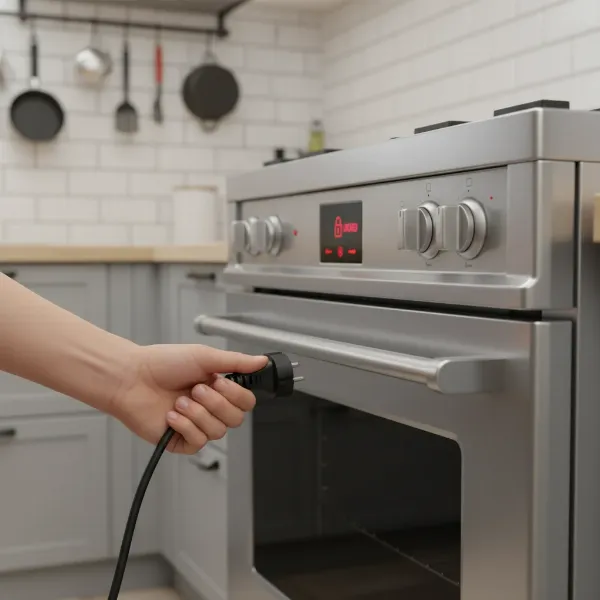 An illustration of a hand unplugging an oven from an electrical outlet, symbolizing a power reset to unlock a stuck oven door.
Advanced Troubleshooting for Persistent Locks
If the power reset didn’t work and your oven is definitely cool, it’s time to delve into a few more specific troubleshooting steps. These methods address other common reasons why an oven door might remain locked after cleaning.
Engage and Cancel a Short Self-Clean Cycle
For some oven models, starting a brief self-clean cycle and then canceling it can help reset the locking mechanism. This method effectively “re-engages” the lock and then “releases” it through the cancellation command.
To try this:
- Ensure Oven is Empty: Make sure there is no food or accessories inside the oven.
- Start a Short Cycle: Initiate a self-clean cycle for a very short duration, such as 15 to 60 minutes.
- Wait and Cancel: Allow the cycle to run for a few minutes (e.g., 5-10 minutes) — long enough for the system to engage the lock. Then, press the “Clear/Off” or “Cancel” button to stop the cycle.
- Cool Down (Again): Give the oven ample time to cool down completely once more, even if you only ran the cycle for a short period. The door should then unlock.
It is crucial to always check your oven’s user manual before attempting this method, as some manufacturers may not recommend it or may have specific instructions for this procedure. Avoid this if your oven is already displaying error codes.
Check for Accidental Child Lock Engagement
Sometimes, the simplest solutions are the easiest to overlook. Many modern ovens come equipped with a child lock feature, which can accidentally be engaged during cleaning or wiping down the control panel. This feature keeps the oven door securely shut and prevents accidental operation. Look for a “Child Lock” button or icon on your control panel. Often, holding this button down for 4-5 seconds (or sometimes longer, depending on the model) will disengage the lock. If that doesn’t work, try holding down the “Clear/Off” button for a similar duration, as some models integrate the child lock function with other controls.
Consult Your Oven’s User Manual
Every oven brand and model can have slightly different operating instructions and troubleshooting procedures. What works for a GE oven might not apply to a Bosch or a Samsung. If you haven’t found a solution yet, your user manual is an invaluable resource. It will provide specific steps for resetting the control panel, dealing with error codes, and unique unlocking sequences for your particular appliance. If you can’t find your physical manual, most manufacturers offer PDF versions online; simply search for your oven’s make and model along with “user manual.”
When to Call the Professionals
While many locked oven door scenarios can be resolved with DIY troubleshooting, there are times when professional intervention is necessary. Knowing when to stop trying to fix it yourself can save you time, money, and prevent further damage.
Recognizing Mechanical or Electrical Faults
If you’ve diligently tried all the above troubleshooting steps—allowing for cooling, performing power resets, attempting short clean cycles, and checking the child lock—and your oven door remains stubbornly locked, the problem likely lies beyond a simple electronic glitch. This could indicate a mechanical or electrical fault within the oven’s complex system. Potential culprits include:
- Faulty Door Lock Motor: The motor responsible for engaging and disengaging the physical latch might have failed.
- Damaged Latch Assembly: The physical mechanism that secures the door could be broken or jammed.
- Defective Temperature Sensor: If the oven’s temperature sensor is faulty, it might incorrectly register the oven as still being hot, preventing the lock from releasing, even if the oven is cool.
- Malfunctioning Control Board: The “brain” of your oven, the electronic control board, could be malfunctioning, failing to send the correct signals to unlock the door.
The Risks of DIY Force
It can be incredibly tempting to try and force open a locked oven door, perhaps with a coat hanger or other tools. However, this is strongly advised against. Oven components operate at high voltages and can be delicate. Attempting to force the door can lead to:
- Further Damage: You could bend the door frame, break the latch mechanism, crack the inner or outer glass, or damage the electronic wiring, significantly increasing the cost of repair.
- Safety Hazards: Tampering with internal components without proper knowledge can pose risks of electric shock or gas leaks (in gas ovens).
Calling a qualified appliance repair technician is the safest and most effective course of action when DIY solutions fail. They have the expertise, tools, and experience to diagnose the exact issue and repair it without causing additional damage, ensuring your oven is returned to safe and proper working order.
Conclusion: Unlocking Your Oven Safely
An oven door stuck after a self-cleaning cycle is a common and undoubtedly irritating issue, but it’s typically a fixable one. Remember that the initial lock is a crucial safety feature, preventing accidents due to extreme heat. The key steps to unlocking your oven involve patience, particularly allowing for complete cooling, followed by a strategic power reset. If these foundational steps don’t work, exploring a short self-clean cycle, checking for child lock engagement, and consulting your user manual are the next logical progressions.
However, if your efforts prove fruitless, resist the temptation to force the door open. This could exacerbate the problem and lead to more expensive repairs or even safety hazards. Instead, recognize when it’s time to enlist the help of a professional. An appliance repair technician can accurately diagnose underlying mechanical or electrical failures and restore your oven’s functionality safely and efficiently. Always prioritize safety, refer to your oven’s specific manual, and don’t hesitate to seek expert help when troubleshooting reaches its limit.
When was the last time your oven put you in a cooking conundrum?
Frequently Asked Questions
How long after self-clean does an oven unlock?
Most ovens unlock automatically between 30 to 90 minutes after a self-cleaning cycle, once the internal temperature has safely dropped below a specific threshold, often around 200°F (93°C). For heavily soiled ovens or those in cooler environments, it might take up to two hours for the door to release.
What if unplugging the oven doesn’t unlock the door?
If a power reset doesn’t work, the issue likely stems from a mechanical or electrical fault beyond a simple software glitch. This could involve a malfunctioning door lock motor, a faulty latch assembly, a defective temperature sensor, or a problem with the main control board. At this point, it is recommended to contact a professional appliance repair technician for diagnosis and repair.
Is it normal for an oven to stay locked overnight?
No, it is not normal for an oven door to remain locked overnight after a self-cleaning cycle. If your oven is still locked after several hours, even after being completely cool, it indicates an underlying problem. This could be due to a faulty component or an electronic error. You should seek professional assistance to resolve the issue.
Can I force open a locked oven door?
No, you should never attempt to force open a locked oven door. Forcing it can cause significant and expensive damage to the door hinges, latch mechanism, glass panels, or the internal electronic components. This can turn a minor issue into a major repair and potentially create safety risks. Always follow the recommended troubleshooting steps or call a qualified technician.